Nepal HMIS FHIR Implementation Guide – 🚨 DRAFT VERSION - Local Development build (v0.0.1-ballot) built by the FHIR (HL7® FHIR® Standard) Build Tools. See the Directory of published versions
Indicators
Indicators are a machine-readable expressions that define the indicator and its input variables, population, and stratifiers. Indicators are expressed using FHIR Measure resource.
- L2 indicator definition
- Data dictionary
- CQL dependencies
Outputs
- Measure FHIR artifact
- Example MeasureReport corresponding to the test / example data included
Activities
Measures are FHIR resources and can refer to CQL libraries.
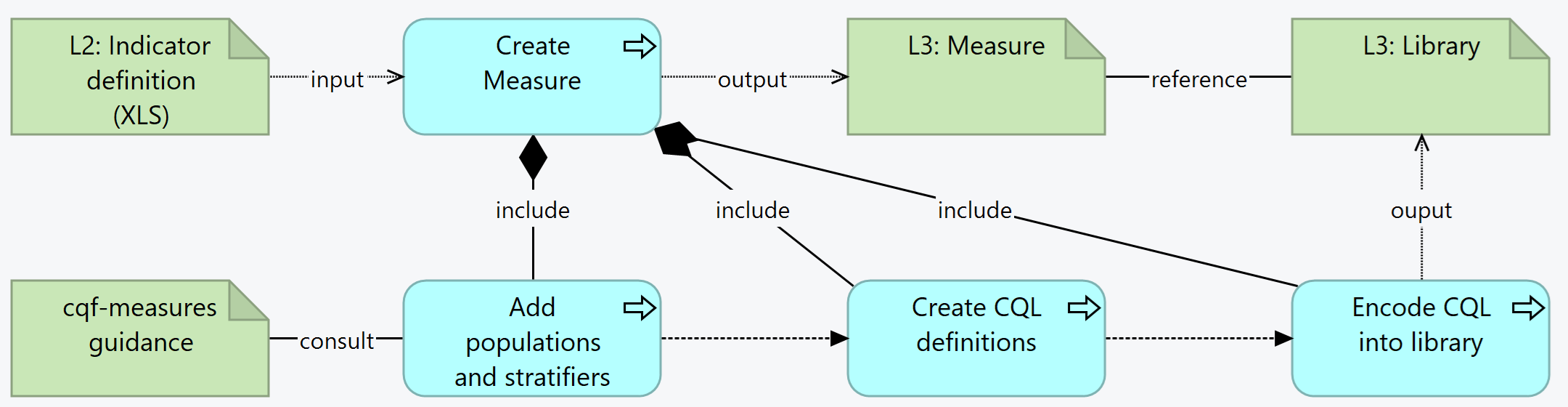
Summary: For each indicator in the L2, the L3 author creates a Measure resource. This includes adding populations and stratifiers (consulting the CQF-Measures guidance). The create the CQL definitions needed for the calculations, which will be encoded into the Library resources.
- For each indicator in the L2, create a Measure
- a. The Measure SHALL conform to the appropriate scoring profile based on the scoring type:
- b. NOTE: Proportion measures with an estimated denominator are modeled as continuous variable measures to allow the metric to be collected and analyzed downstream as a proportion measure when the estimated denominator is known
- c. The Measure ID should be derived from the indicator code, e.g. IMMZ.IND.08 -> IMMZIND08
- d. Url: The URL SHALL be: [base canonical]/Measure/[id]
- e. Version: Do not set the version element, it will be set by the publication process
- f. Name: The Name SHALL be the same as the id
- g. Title: The L2 Indicator ID e.g. IMMZ.IND.08 Immunization coverage for Measles containing vaccine (Estimated Denominator)
- h. Description: The long description of the indicator (i.e. the indicator description)
- Create an "indicator" logic library specific to the measure, e.g. IMMZIND08Logic
- a. The logic library SHALL contain expressions for each population criteria appropriate to the scoring type of the measure
- b. The logic library SHALL make use of an IndicatorElements library to reference data elements from the guideline
- c. The logic library MAY make use of an IndicatorLogic library to share common logic between multiple indicators in the guideline
- Create a
group appropriate to the scoring type (only one group is supported)
- a. group.id SHALL be the same as the name of the measure
- b. create populations appropriate to the scoring type (https://build.fhir.org/ig/HL7/cqf-measures/measure-conformance.html#criteria-names)
- c. each population references an expression in the indicator library
- Create or reuse a CQL library that contains the definitions and functions that are needed for the Measure
-
Add the canonical URL of the Library to the Measure
- Depending on the type/purpose of the indicator, define the value for the measure
scoring.
-
Add the type and improvementNotation
-
From the scoring, see what populations are permitted - according to the CQF Guidance
- For each population, define the code and id, the description, and the cql expression that evaluates the population. For example,
```
- group
- id = "IMMZIND08"
- population[0]
- id = "measure-population"
- code = $measure-population#measure-population
- description = "Number of administrations of vaccinations containing a Measles component during reporting period"
- criteria
- language = #text/cql
- expression = "measure-population"
```
- For each stratifier, define the id and the cql expression that evaluates the population. For example,
- L3 Authors must create a set of stratifiers which is the permutations that are considered important. The stratifiers produce aggregate values and it may be impossible to disaggregate inside a stratifier.
```
- stratifier[+]
- id = "age-group-stratifier"
- criteria
- language = #text/cql
- expression = "Age Group Stratifier"
```
NOTE: Determining effective data requirements is a detailed process and should be done through the use of tooling such as the CQF Tooling to process Measure and Library resources
-
Add a contained Library to the resource and refer to it using the expression EffectiveDataRequirements.
-
If known, add the data requirements:
- add codes that are used directly in the measure
Add the libraries that contain the functions
Output Criteria / Definition of Done